> For the complete documentation index, see [llms.txt](https://server-side.docs.sirdata.net/sirdata-server-side/llms.txt). Markdown versions of documentation pages are available by appending `.md` to page URLs; this page is available as [Markdown](https://server-side.docs.sirdata.net/sirdata-server-side/english-1/f.a.q-server-side/sgtm-portal/add-a-payment-method.md).
# Add a Payment Method
To enter your payment information on your Sirdata account, follow the steps below:
#### Steps to follow
1. **Log in to your Sirdata AbConsent account**\
Access your customer area via
2. **Access your profile**\
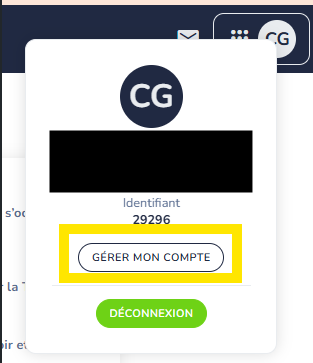
Click on your **initials** at the top right of the screen, then select **"Manage my account"** in the dropdown menu.
Manage my account
3. **Open the billing section**\
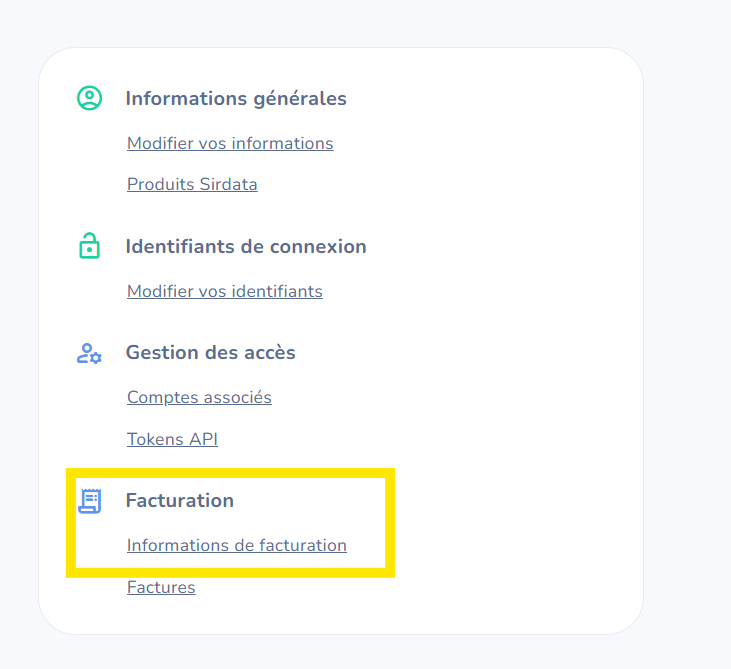
In the left-hand menu, click on **"Billing"** then on **"Billing information"**.
Billing Information
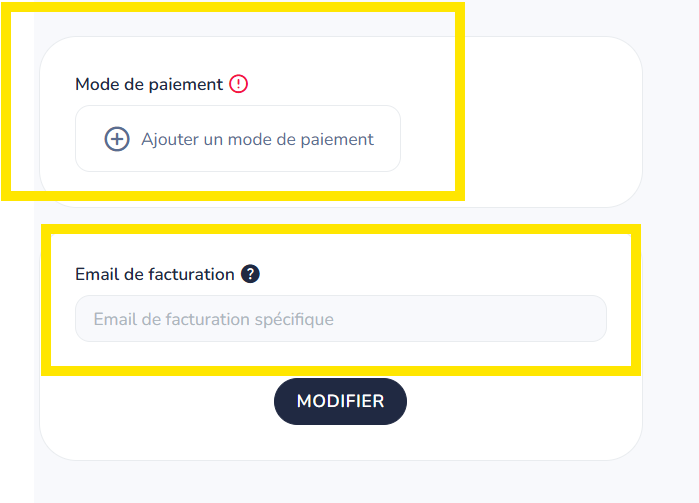
4. **Add a payment method**\
Click on the button provided to add a payment method, then enter the requested information (card type, number, expiration date, etc.).