> For the complete documentation index, see [llms.txt](https://server-side.docs.sirdata.net/sirdata-server-side/llms.txt). Markdown versions of documentation pages are available by appending `.md` to page URLs; this page is available as [Markdown](https://server-side.docs.sirdata.net/sirdata-server-side/english-1/f.a.q-server-side/sgtm-portal/authorize-sirdata-to-access-your-account.md).
# Authorize Sirdata to Access Your Account
To authorize Sirdata to log in on your behalf and assist you with your products:
* Log in to your Sirdata CMP account.
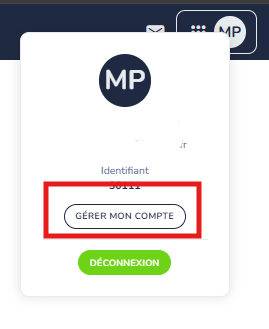
* Navigate to the **"Sirdata Account"** section and click on **"Manage my account":**
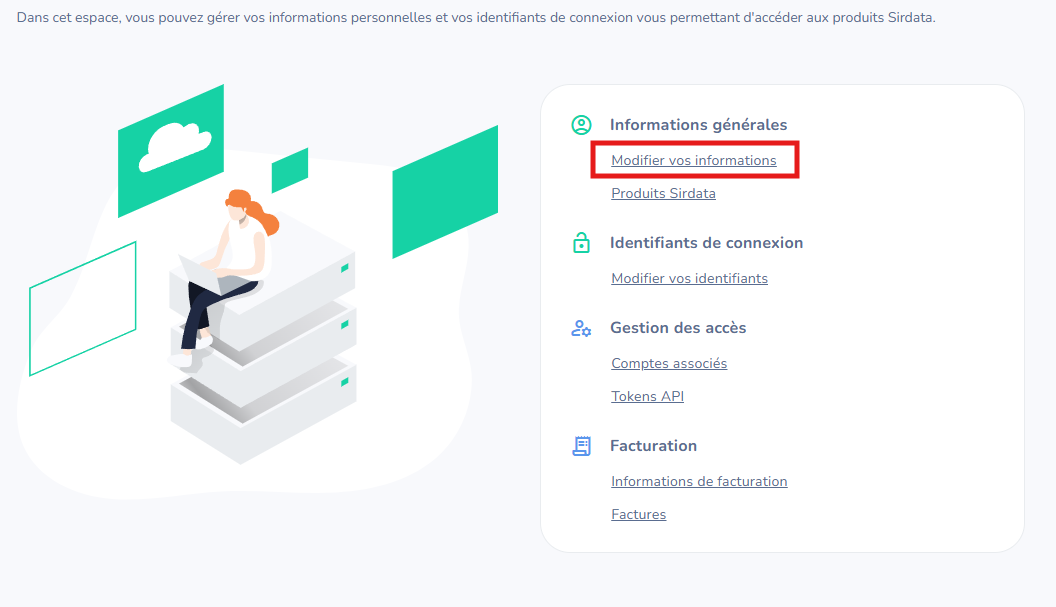
* Click on "**edit your information**":
* Enable the **toggle**: