> For the complete documentation index, see [llms.txt](https://server-side.docs.sirdata.net/sirdata-server-side/llms.txt). Markdown versions of documentation pages are available by appending `.md` to page URLs; this page is available as [Markdown](https://server-side.docs.sirdata.net/sirdata-server-side/english-1/installation/data-processing/integrating-sirdata-data-into-the-gtm-layer.md).
# Integrating Sirdata Data into the GTM Layer
## 1. How to use Sirdata data?
### a. Creating a variable in GTM
To leverage the enriched data provided by Sirdata, it is essential to create variables in your GTM container. These variables will allow you to retrieve the specific information sent by Sirdata.\
The names of these variables are available in the Sirdata Server-Side documentation: [the GTM Helper Layer page](/sirdata-server-side/english-1/installation/data-processing/gtm-helper-layer.md)
**Steps to create a variable:**
1. Access your GTM container.
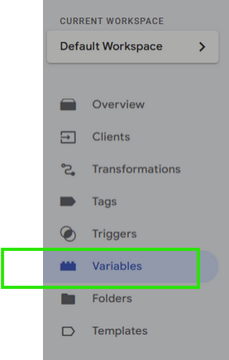
2. Navigate to the "Variables" section.
3. Click "New" to add a new variable.
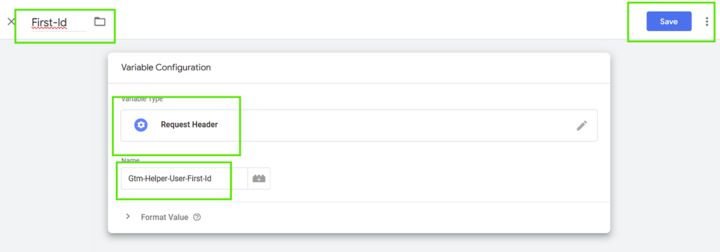
4. Select the variable type "Request header"
5. Name the variable explicitly to make it easy to identify:
**Examples of commonly used variables:**
* **First-Id**: Identifier assigned to the user by First-ID.
First-Id
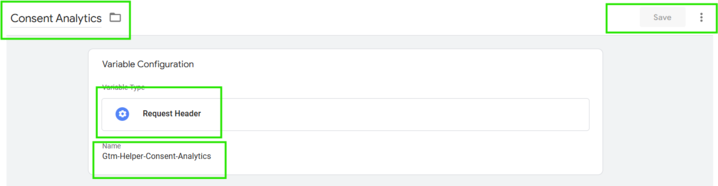
* **Consent for Analytics**: Indicates whether the user has consented to the collection of analytics data.
Consent for Analytics
## 2. Concrete examples of using the variables
### a. Using them in a trigger to control tags
**Example: Analytics Consent**
Suppose you want to fire or block tags based on the user's consent for analytics purposes.
**Steps to follow:**
1. **Creating the consent variable:**
* Create a variable named "Gtm-Helper-Consent-Analytics" that retrieves the consent signal for audience measurement.
* This variable can take the values `true`, `false` or `undefined`, depending on the user's consent.
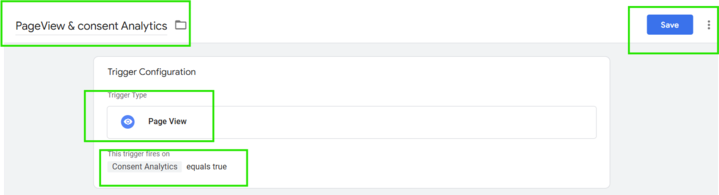
2. **Creating the consent-based trigger:**
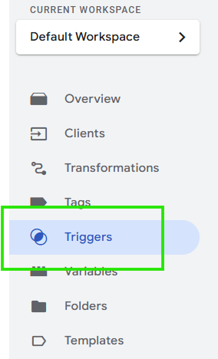
* In the "Triggers" section of GTM, create a new trigger.
Triggers
* Define a condition so that the trigger fires only if "Gtm-Helper-Consent-Analytics" equals `true`.
Consent Analytics equals true
1. **Associating the trigger with the tag:**
* Assign this trigger to the relevant tags (for example, a Google Analytics tag) so that they only fire when the user has given consent for analytics.
### b. Using them in a tag to enrich data
**Example: Enriching Facebook's external identifier (external\_id) with First-Id**
To improve tracking and ad targeting on Facebook, it is possible to enrich the data sent with a unique identifier provided by Sirdata.
**Steps to follow:**
* Use the Sirdata variables to add information as an external identifier (external ID) in a Facebook tag.
* This enriches the data sent to Facebook with Sirdata information.