> For the complete documentation index, see [llms.txt](https://server-side.docs.sirdata.net/sirdata-server-side/llms.txt). Markdown versions of documentation pages are available by appending `.md` to page URLs; this page is available as [Markdown](https://server-side.docs.sirdata.net/sirdata-server-side/english-1/installation/dns-configuration/cloudflare.md).
# Cloudflare
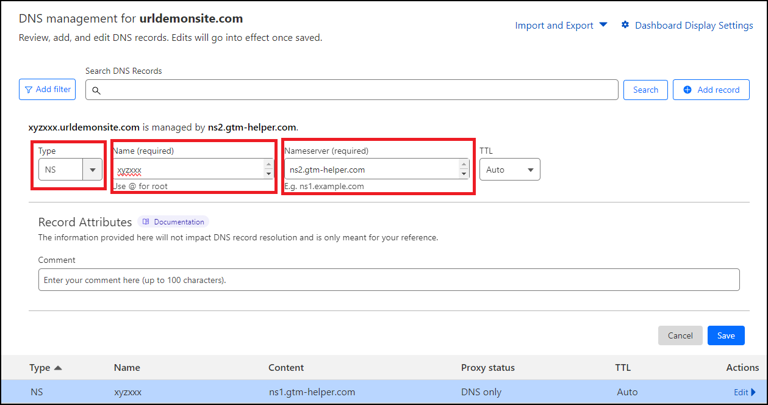
Select the URL affected by the Server-Side :
{% hint style="info" %}
Add a first entry with a "NS" pointing field using the subdomain you previously selected in your GTM (e.g., xyzxx) and the nameserver URL "ns1.gtm-helper.com"
{% endhint %}
**Save**
Type "NS", Name "xyzxxx", Nameserver "ns1.gtm-helper.com"
{% hint style="info" %}
Repeat the operation a second time for the same subdomain, with the nameserver URL "ns2.gtm-helper.com"
{% endhint %}
Type "NS", Name "xyzxxx", Nameserver "ns2.gtm-helper.com"